Most websites do not fail at SEO because of one big mistake. They fail because of twenty small ones. A missing alt tag here, a title tag that is too long there, a page with no internal links pointing to it. Each one is small, but together they hold a page back from ranking.
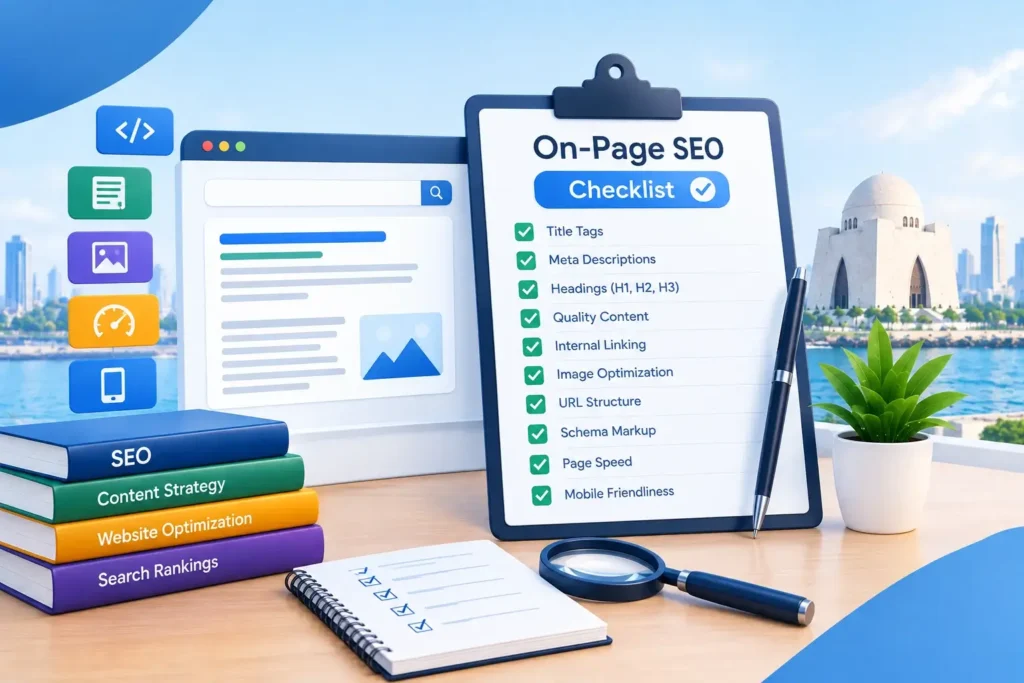
This checklist walks through 20 things to check on every important page of your website. You do not need to be technical to use it. Go section by section, and fix what applies to your page.
1. Keyword and Search Intent
Before you touch a single tag, make sure the page is built around the right search and the right purpose.
1. Pick one main keyword per page
Every page should target one main keyword, not five. If two pages on your site target the same keyword, they compete with each other instead of helping each other. This is one of the most common mistakes we see when we do on-page SEO for a new client in Karachi.
2. Match what the searcher actually wants
A search for “on page seo checklist” wants a list, not a sales pitch. A search for “on-page SEO company in Karachi” wants a service, not a blog post. Before you write anything, ask what the person searching is trying to do, and build the page around that.
2. Title Tag and Meta Description
These two lines are what someone sees on Google before they ever visit your page.
3. Put your keyword near the start of the title tag
Your title tag is one of the strongest on-page ranking signals you control. Keep your main keyword close to the beginning, not buried at the end.
4. Keep the title tag under 60 characters
Google cuts off longer titles in the search results. A title that gets cut mid-word looks unfinished and gets fewer clicks, even if the ranking is fine.
5. Make every title tag unique
No two pages on your site should share the same title. Duplicate titles confuse Google about which page to rank for a given search.
6. Write a meta description that earns the click
The meta description does not directly affect rankings, but it decides whether someone clicks your result or the one above it. Keep it under about 155 characters, and give a clear reason to click, not just a repeat of the title.
3. Headings and Content
Headings are not just formatting. They tell Google, and now AI tools, what your page actually covers.
7. Use exactly one H1 per page
Your H1 is your main headline. A page should have one, not two or three, and it should include your main keyword naturally.
8. Keep your heading levels in order
Use H2 for main sections and H3 for smaller points inside them, in that order. Do not jump from an H2 straight to an H4. This checklist itself follows that pattern, on purpose.
9. Answer the main question in the first few lines
Do not make people scroll to find out if your page has what they need. Open with a direct answer or a clear summary, then explain the details below it.
10. Write enough to actually cover the topic
There is no magic word count, but a page that only says a little about a big topic struggles to rank against pages that explain it properly. Cover the topic in real depth, in plain language.
4. URLs and Internal Links
How your pages are named and connected matters more than most people expect.
11. Use a short, clean URL
A URL like /on-page-seo/ tells Google and the visitor exactly what the page is about. A URL full of numbers or random letters does not.
12. Link to related pages with real anchor text
Instead of writing “click here,” link using words that describe the destination, like technical SEO or content writing services. This helps both visitors and Google understand what the linked page covers.
13. Make sure every important page gets at least one internal link
A page with no internal links pointing to it is called an orphan page, and Google struggles to find and trust pages like that. If a page matters, link to it from somewhere.
5. Images
Images affect both your rankings and how fast your page loads.
14. Add real alt text to every image
Alt text describes an image for people who cannot see it, and it also helps Google understand the image. Describe what is actually in the picture. Do not stuff it with keywords that do not fit.
15. Compress images and set their size
Large, uncompressed images slow your page down, and a page that loads slowly loses both visitors and rankings. Compress images before uploading, and where possible, keep their dimensions set so the page does not jump around as it loads.
6. Mobile, Speed, and Trust
These are not purely “on-page” in the technical sense, but they are things you check on every page, so they belong on this list.
16. Check the page on a real phone
Most of your visitors in Karachi are browsing on a phone. Text should be readable without zooming, buttons should be easy to tap, and nothing should scroll sideways.
17. Keep an eye on page speed
A slow page loses visitors before they even read your content. If your pages feel slow, our technical SEO service covers the fixes that usually matter most: images, unused scripts, and hosting issues.
18. Show real trust signals on the page
A visible phone number, a real address, and honest information about your business help both visitors and Google trust the page. This matters even more for pages about money, health, or legal topics.
7. Structured Data (Schema)
19. Add the right schema markup
Schema is a small piece of code that describes your page to Google in a language it understands directly, like marking a list of questions as an FAQ, or a business address as a local business. It will not fix a weak page, but it helps a strong page get understood faster.
8. Made for AI Search Too
20. Structure content so AI tools can use it, not just Google
More searches now end in an AI answer instead of a list of links. The same habits that help this checklist, direct answers, clear headings, and real depth, also help your page get picked up and quoted by AI tools. We cover this in more detail in our guide on SEO for AI search.
The 20-Point Checklist, All in One Place
- Pick one main keyword per page
- Match what the searcher actually wants
- Put your keyword near the start of the title tag
- Keep the title tag under 60 characters
- Make every title tag unique
- Write a meta description that earns the click
- Use exactly one H1 per page
- Keep your heading levels in order
- Answer the main question in the first few lines
- Write enough to actually cover the topic
- Use a short, clean URL
- Link to related pages with real anchor text
- Make sure every important page gets at least one internal link
- Add real alt text to every image
- Compress images and set their size
- Check the page on a real phone
- Keep an eye on page speed
- Show real trust signals on the page
- Add the right schema markup
- Structure content so AI tools can use it too
Quick Questions
Do I need to do all 20 things on every page?
Most of them, yes. A few, like schema, matter more on some pages than others. Start with the title tag, headings, and internal links, since those tend to matter most.
How is on-page SEO different from technical SEO?
On-page SEO covers what is written and structured on the page itself: titles, headings, content, links. Technical SEO covers the site’s underlying health: speed, crawlability, and code-level issues. See our technical SEO page for that side of it.
Can I check this myself without hiring anyone?
Yes, for a small site. Go through each of the 20 points above on your main pages. For a larger site, or if you want a second set of eyes, an SEO agency can run through it faster and catch things a first pass often misses.
How often should I redo this checklist?
Revisit your most important pages every few months, and any time you make major changes to your site or your services.
Want This Done for You?
Going through every page on a growing website takes time. Our on-page SEO services in Karachi cover this full checklist and more, as part of a clear monthly plan. You can request a free audit here and we’ll tell you exactly what needs fixing first.
Want More Calls From Google?
Get a free SEO audit from our team. We will check your site and tell you what to fix first. No pressure, no long contracts.